
Work order generation in resco.FieldService
| resco.FieldService |
|---|
|
|

| Warning | Work in progress! We are in the process of updating the information on this page. Subject to change. |
Work order is perhaps the most important concept in field service. resco.FieldService includes multiple ways how to create work orders:
- Create a work order manually from scratch.
- Create a work order manually from a customer incident. See Incident management in resco.FieldService.
- Create a work order manually from maintenance plan notification.
- Generate a work order automatically (described in this article).
Prerequisites
resco.FieldService organizations created after release 14.2 can automatically generate work orders. If you created your organization after September 28, 2021, your organization contains all the necessary components for this function out of the box.
If you have an older organization, you have two main options:
- Create a new organization. Import data from old to new.
- Create a new organization. Import data model changes and business logic from new to old.
Consider using the Connected Environments function in the Admin Console to perform the migration.
Main components
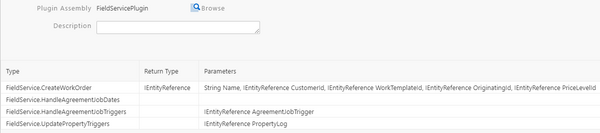
- FieldServicePlugin: This is a Resco Cloud server plugin with several critical functions for automatic generation. See Exporting plugins for information on how to transfer plugins to a different organization.

- Server processes that trigger and execute plugin functions. You can create or modify these to suit your needs.
- HandleJobDates: daily job, running at midnight
Server Execute Plugin.FieldService.HandleAgreementJobDates
- PropertyLogTrigger: workflow triggers when a Reading record is created or modified.
Server Execute Plugin.FieldService.UpdatePropertyTriggers Entity.@this
- CheckMaintenanceWorkTriggers: workflow triggers when a Maintenance Job Trigger is modified.
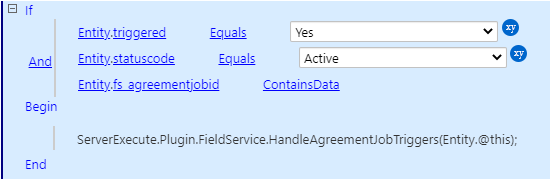
- CheckMaintenanceWorkTriggers: workflow triggers when a Maintenance Job Trigger is modified.
