
Plug-in assemblies
This document is a brief summary of plug-in assemblies in Resco Cloud and their implementation to the processes (workflows).
Getting started
Plug-in assemblies allow you to run custom C# code on the Resco Cloud as part of the Processes. Plugins can run periodically as jobs or be triggered as workflows. It should solve the limitations of the no-coding editor of processes. There are the typical use cases:
- complex logic of process
- communication with some third party system
- etc.
Creating a plug-in assembly
- Download Resco SDK.
Sample projects are part of the RescoCRM.Plugin.SDK.zip file. - Create a new project as a Class Library (.NET Framework 4.6.2).
- Add a reference to the downloaded XRMServer.Core.dll.
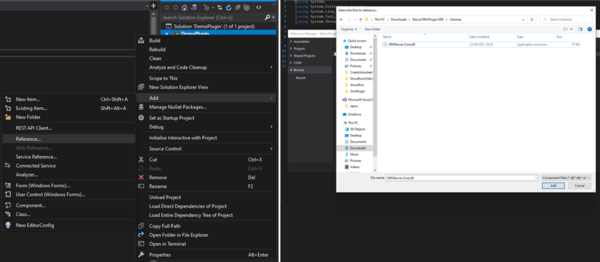
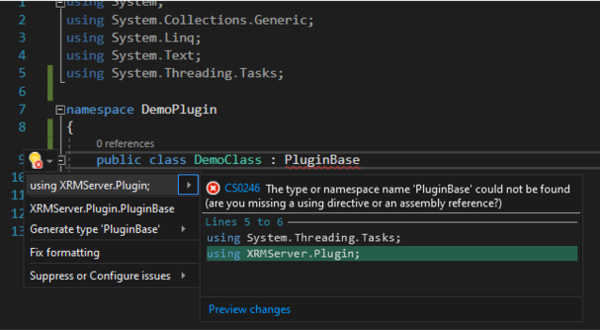
- Implement the PluginBase interface.
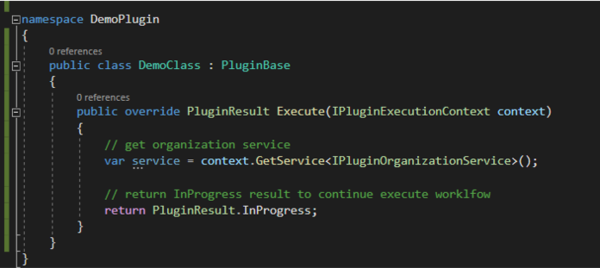


Return value of plugin
You can define the return value of your plugin.
Implement the IPluginReturnValue interface to the code (e.g. string):

These are the allowed return types: It should be possible to create a variable of this type in Processes editor.

Input values of plugin
You can define the input values of your plugin.

The name of the PluginInputParameter (MyPluginInput in the example), will be visible in the Processes editor.

Logs
context.AppendLogLine("Contacts with specified account id '{0}' cannot be found!", accountId);
Logs are saved and visible in the Admin Console under Processes Center > Logs.
Cancel the workflow execution
context.AppendLogLine("Contacts with specified account id '{0}' cannot be found!", accountId);
return PluginResult.Failed;