
Power Automate
| Warning | This page describes a function that has not yet been publicly released, or has been released in beta / preview quality. Subject to change. |
| Integration with third-party systems |
|---|
|
Resco CRM Connector (web APIs):
|
Power Automate is a Microsoft service that helps you create automated workflows between your favorite apps and services to synchronize files, get notifications, collect data, and more. Power Automate can be used to connect a Resco Cloud organization with other CRM/ERP backend systems, such as Microsoft Dynamics 365 Business Central.
Benefits
- Connecting backends is often a complex and time-consuming endeavor. Use Microsoft-standardized integration to save time and money.
- Automating the communication can extend Resco Cloud benefits to the users of other backends, for example, offline mobility or some field service functions.

Resco Cloud connector
The Microsoft-certified Resco Cloud connector exposes a couple of operations that allow you to seamlessly create, read, update, and delete records.
Prerequisites
In order to use this connector, you will need the following:
- An organization at Resco Cloud or any affiliate product from Resco website.
- You can sign up for a free trial.
- An user account with schema access privilege or system administrator privilege.
Authentication
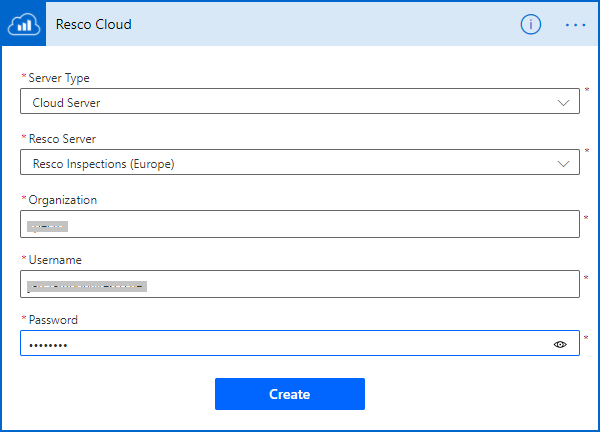
This connector uses Basic authentication. When creating a new connector (in Power Apps/Logic Apps), you must provide login credentials. You must also select a server to use with this connector and the organization name you specified during sign-up.
Supported operations
This connector supports the following operations:
- List records: Get a list of records.
- Get record: Get record with a specific ID.
- Create a new record: Create a new record.
- Delete record: Delete record with a specific ID.
- Update record: Update record with a specific ID.
- Get current user: Get the current user record associated with login credentials.
Creating a sample flow using the connector
In the following example, we are creating an instant flow that retrieves some records from Resco Cloud and saves them to Common Data Service.
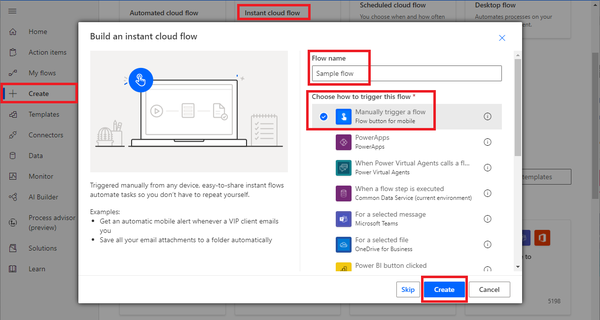
- Select Create from the menu, then select Instant clow flow.
- Enter a flow name and choose how the flow should be triggered.
- Click New step.

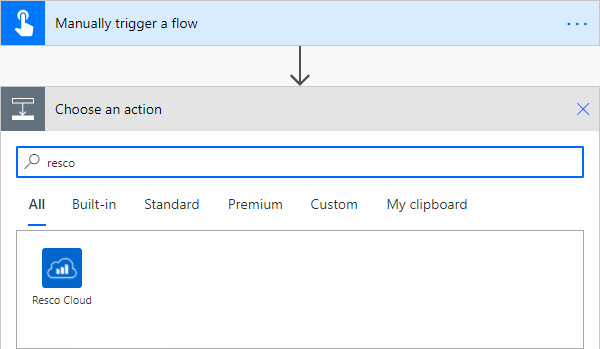
- Search for 'resco' and select Resco Cloud connector.
- Select an action for the connector, for example, Get record.
- Connect to your Resco Cloud, Resco Inspections, or Resco Routes organization.
- TBD.


Building custom connectors
Resco has prepared OpenAPI definition files that can be used by Power Automate to create a custom connector for interfacing with Resco Cloud. Both YAML and JSON formats are available. When using an OpenAPI definition to describe a custom connector in Power Automate, the file must be less than 1 MB. Therefore, the API definition only includes selected entities by default. Contact Resco support for more information.
| Tip | The API definition files can be also utilized by other tools and services compatible with the OpenAPI standard, not only Power Automate. |
(Coming soon): You can also generate your own OpenAPI file with entities necessary for your particular use case. In the Admin Console, select TBD from the menu; then select the entities (fields?) that you need.