Releases/Spring 2020
| Warning | This page describes a function that has not yet been publicly released, or has been released in beta / preview quality. Subject to change. |
The Spring 2020 update (v13.0.0) is planned for April 2020.
- Release preview Blog
Resco Inspections
Smart questions
Users of Questionnaire Designer can configure simple business logic directly from the questions, instead of having to use more technical Rules editor for the most common rules. For questions, you can control whether they are visible, editable, and required. For groups, you can control whether they are visible and expanded.


Smart default values
Instead of writing a complicated OnLoad rule to add default values to the questionnaire, it is now possible to set the default in the question editor. The default value can be a constant, or in a few most common scenarios a field whose value is fetched for you.

Smart styles
In the case of numeric questions and option sets, you can now simply add a specific style to the values that are answered.
File:Spring 2020 smart style.png
Questionnaire icon
Make the template stand out in the Questionnaire Designer, as well as in the application, by adding a custom icon to the template.


New static question type: Logo
A new static question type has been added where the user can add a logo on top of the questionnaire template. This logo is automatically reused in the Automatic Report as a header.

New design
New, sleeker, and more intuitive design of all question types in the Questionnaire Designer.
Schedule Board: Assign templates, new map view
You can now use the Schedule Board to assign a questionnaire template to a specific user when scheduling an appointment. Edit a task and switch to the new Inspections tab.

The Schedule Board now has a new map view where you can see all the scheduled appointments on the map.
Reuse answers
You can now use fetch variable Template:Regarding to access (related) entity of activity, if the activity is regarding record of questionnaire in the Reuse answers filter. For example, this can mean that you can reuse previous answers from a specific Account, or a specific Asset, even if opened through Appointment. See Reuse questionnaire answers from related records.
Optimized data storage
Mobile reports and Results Viewer now support questionnaires answered and stored in JSON and compressed JSON formats.
Innovations
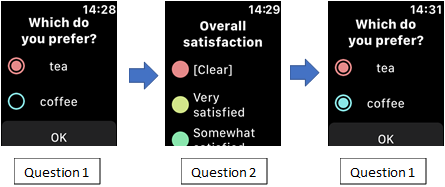
Smartwatch integration
This release brings several small usability updates:
- The possibility to edit previously answered questions: It is now possible to go back in the questionnaire on the smartwatch and edit an already answered question.