
Releases/Winter 2024
| Warning | Work in progress! We are in the process of updating the information on this page. Subject to change. |
The 17.0 / Winter 2024 release is planned for January 2024. Find the download links for the latest preview version on the Preview page.
Resco mobile platform (Microsoft, Salesforce, Resco Cloud)
AI-assisted help in Woodford
The AI assistant Help is a helper utilizing the language model Chat GPT, which we have trained with all knowledge about Resco technology. This assistant is capable of assisting you with any questions regarding customization, configuration, and processes in the Resco platform, Resco products for Power Platform, and essentially, you can ask it any question related to Resco technology. To enable the AI assistant, you need to enter an API key in the Settings screen of Woodford. If you would like to try it out, please contact us at product@resco.net.

Migration from Xamarin to .NET platform
Android and iOS versions of the Resco Mobile CRM app were migrated from the legacy Xamarin framework to the latest version of the .NET platform. This change ensures that Resco technology will benefit from state-of-the-art Microsoft cross-platform framework and runtime.
Salesforce QoL improvements
- No need to reconnect organization after sandbox refresh or organization changed
- Until this release, Salesforce admins had to go through the tedious process of reconnecting Resco with Salesforce whenever their organization name or ID changed. Admin had to back up all Resco-related data such as App Projects or Mobile Reports. This procedure was especially daunting after a full refresh of the sandbox. Now, it is no longer needed. The only reason an admin needs to reconnect is when the URL of your organization changes.
| Note | This is only applicable for organizations connected using version 17.0 or later. So if you have organization connected earlier, you will still need to do one more reconnect. |
- Faster metadata update
- We are listening to feedback regarding long metadata update times, and in this release, we made sure it is way faster than before. Moreover, objects are now listed on the screen as the metadata is updated. You can also easily copy the log for later analysis.
- Whitelist localizations
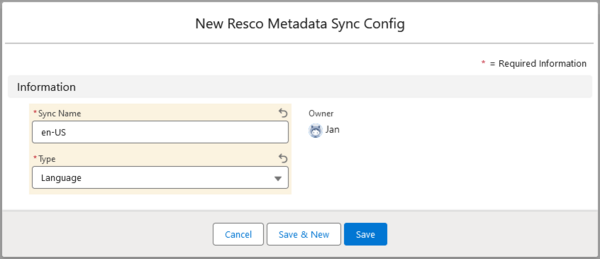
- Localizations are updated along with metadata. You can now significantly speed up the process by making only selected languages available in Resco. Use the Salesforce object blacklist and add only the necessary languages to the whitelist. Enter either

Salesforce API 59.0
Resco now supports Salesforce API 59.0 (Winter 2024). The previous maximum supported API version was 52.0.
Support for new languages
Four new languages are now available in Woodford.
| Language | ISO code | LCID |
|---|---|---|
| Dari | prs | 0140 |
| Hausa | ha | 0104 |
| Kinyarwanda | rw-RW | 1159 |
| Kurdish | ku | 0146 |
Bring some color to flexible forms

As you probably know, forms in the mobile apps can be displayed in two ways:
- Tabbed view: one tab at a time + tab selector at the top or bottom
- Flexible view: all form content displayed at once, available by scrolling if it does not fit on the screen
This release brings more control over how flexible forms are displayed. First of all, we're introducing the industry-standard term cards. This is what we call the individual blocks on flexible forms. Previously, we used to call them tabs - but flexible forms have no tabs.
More importantly, you can now define a custom color scheme for cards. Colors allow users to easily distinguish where cards start and end. This is important because cards group related information into a single block, reducing the chance for confusion among the users. Cards also apply to questionnaires: one question group equals one card, adding clarity.
So, how to get started? Edit the theme in Woodford and enable Advanced color settings. Note the new set of colors in the Card section. So go ahead and make your cards stand out.

Code editor in Woodford
Woodford is mostly a no-code/low-code tool. However, some no-code features also have a code representation, and some, such as JSBridge, are code-only. For users who prefer code, we have now integrated a better code viewer/editor in Woodford.
In this preview version, the new code editor is used in:
- Offline HTML: replacing the previous text editor window.
- Rules editor: new feature displaying the rule code in XML format
The new editor has useful features such as line numbering, syntax highlighting, or HTML/XML syntax validation.

Segmented buttons for "fake" option sets
In Resco, text input fields can be formatted as a dropdown list. In this release, the app can display such dropdown lists as segmented buttons. Use styles to enable this feature.
Chips for multiple options
Controls that allow you to select multiple options can now display the options as chips.
View designer: flexible cells
We have changed how field cells behave in views. Cells marked as flexible grow wider when the available space for the entire view row increases. Empty spaces between cells don't change width. This feature replaces the confusing anchoring mechanic.
Storage analyzer: questionnaire statistics
A new report in the Storage analyzer offers more insights into the questionnaires and their local storage consumption in the Resco Mobile CRM. The report includes:
- Number of templates and data questionnaires (answers), as well as their storage needs
- Template statistics by storage type, template dependency, versioning
- Largest data questionnaires
- Largest templates (used/unused)
- Largest columns for templates/data questionnaires
- SyncDownloader stats highlights
Resco modules for Power Platform and Dataverse (Microsoft)
Guide readers can report issues
Users of Resco Steps+ (Guides on the Power Platform) can now comment on individual guide steps and suggest improvements. See Allow users to report issues.
Sample Power Automate flows
Power Automate is a powerful tool, but coming up with the right usage scenario can sometimes be daunting. Our consultants analyzed what some of our partners and customers are doing and came up with a list of examples of how Power Automate and Resco can be used to streamline processes. See Sample Power Automate flows for more information.
Inspections and questionnaires (Microsoft, Salesforce, Resco Cloud)
Use optical character recognition (OCR) to answer questions
A regular maintenance visit, for example, inspecting a piece of machinery, can often be smooth if your questionnaire is well-designed and guides users through all the necessary steps. The process of registering a new piece of machinery into the database can be much more complicated and prone to errors. If the inspector has to read some details about a piece of machinery and enter them into the app... OCR comes to the rescue. Users can take a photo of the product label, let the device extract text from the image, and use the text as answers.
- Edit a questionnaire template.
- Go to Options and set Feature version to 3 or later.
- Select a question of the type "Text" or "Multiple Lines of Text".
- On the Properties pane, select Enable OCR.
- As OCR reference image, do one of the following:
- Select one of the existing images from the questionnaire template. The image answer will be used as an OCR source. This must be a single-image answer (Max Count=1).
- Leave the field empty. Users can create or choose an image as usual, but the image won't be saved as part of the questionnaire.
- Save all changes.
In the app, OCR is available for Android, iOS, and Windows UWP editions of the app; both offline and online. The exact function and performance depend on the capability of the device's native OCR library. As usual, large and high-resolution images may take a while to process. Resco cannot guarantee the quality and/or performance of the OCR library.
The app displays the image with extracted text superimposed on it. Users can select which line of text from the image they want to save into a particular text field. They can edit the extracted phrase before storing it as the answer.


Export and import wizard
The process of exporting and importing questionnaire templates has been redesigned to support different scenarios. Users have more control over what and how to export and import. You can effortlessly import new versions of existing questionnaire templates. Reports related to questionnaires no longer get disassociated.

When exporting, you can select whether to include version history and associated reports.

When importing, you can choose if the template should be appended to an existing versioned questionnaire or created as a brand new template. You can also convert non-versioned questionnaires to modern versioned format.
Resco Cloud
Web app modernized (Resco Cloud)
The browser version of Resco Mobile CRM (web app, available with Resco Cloud backend only) now supports modern theming (dark/light mode), as well as the new way of rendering segmented buttons (including vertical).
Improved cloning/pulling from connected environments
The process of cloning and pulling from connected environments has been redesigned to be more stable. Depending on the amount of data, these activities can take hours. Users no longer have to wait in front of their browser windows. Once the new process is initiated, the first phases are completed within minutes, and the bulk of the action (data transfer) is then performed as long running jobs.
- CloneEnvironmentJob: copies data as well as processes, plugins, and app projects when cloning organization
- PullFromEnvironmentJob: copies data when pulling from an organization
The jobs are executed in 5-minute intervals: 4 minutes of busy action and one minute standing by.
Feature requests
Not a product feature, but worth mentioning: We have changed the way how you can send us feature requests. Check out Resco Support portal or read about the benefits of the new process.
{{#CI form: title = Was this information helpful? How can we improve?
| type = inputs
| [textarea]
}}