
Releases/Summer 2022: Difference between revisions
| Line 33: | Line 33: | ||
We have also improved how custom group icons are displayed. The icons in the group list now match the icons in the questionnaire body. See how to [[Questionnaire_Designer_examples#Add_custom_icon_for_questionnaire_group|add custom icons for questionnaire groups]]. | We have also improved how custom group icons are displayed. The icons in the group list now match the icons in the questionnaire body. See how to [[Questionnaire_Designer_examples#Add_custom_icon_for_questionnaire_group|add custom icons for questionnaire groups]]. | ||
[[File:Group icons windows.png]] | [[File:Group icons windows.png|300px]] | ||
=== Custom commands for Button components === | === Custom commands for Button components === | ||
Revision as of 07:49, 18 May 2022
| Warning | This page describes a function that has not yet been publicly released, or has been released in beta / preview quality. Subject to change. |
The Summer 2022 release (15.1) is planned for late June 2022.
Okta authentication for Resco Cloud
Resco Cloud can use Okta for authentication.
Resco can communicate with external document storage providers like SharePoint. In general, integrations with third-party services are often critical in many projects. In this release, we are improving the options for troubleshooting SharePoint connections in the sync log and storage analyzer. With these tools, support providers are much better equipped to solve common issues like authentication problems, failure to see some documents, or having too many documents (long sync).
Inspections
Change group labels using rules
You can now modify the label of questionnaire groups using rules. For example, the following rule will change the label of a group to "Done" when all questions are answered.

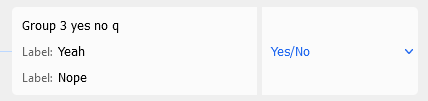
Tweaks to the Yes/No question
- The default labels for the Yes/No question are "Yes" and "No".
- When creating a questionnaire by importing an XLS file, you can now specify custom labels in the file instead of the default "Yes" and "No".

Static image size
Questionnaire designers have now more control over how static images are displayed in the app. Previously, larger images were automatically resized to 600x600 pixels (keeping the ratio). You can now manually set image width and/or height on the Properties pane. This function is not supported in the web app.
UI: Switching between groups & group icons
If your questionnaire includes multiple groups, you can switch between groups. On Android and iOS, you can swipe down to display the list of questionnaire groups. On Windows, this function was missing, but with this release, you can click the questionnaire caption to display this list.
We have also improved how custom group icons are displayed. The icons in the group list now match the icons in the questionnaire body. See how to add custom icons for questionnaire groups.

Custom commands for Button components
If you have custom commands defined in your questionnaire template, these commands are also available as options for buttons. The command's effects are defined using the On Execute rule.
-
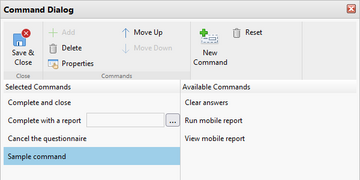 Create a custom command
 -
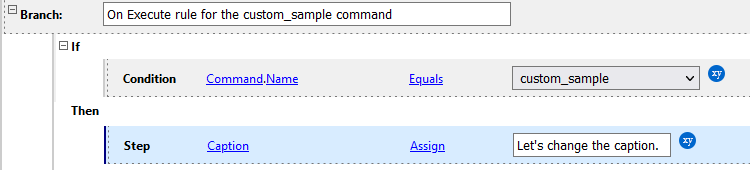 Define command using On Execute
 -
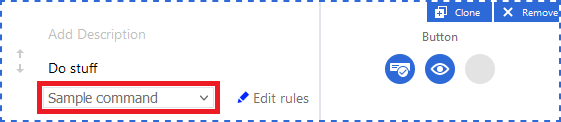 Add command to a button


