
How to report requests: Difference between revisions
| Line 236: | Line 236: | ||
* Make sure the HTML document is a valid HTML file. | * Make sure the HTML document is a valid HTML file. | ||
* Make sure all script references in the HTML file are using the same capitalization, e.g., that you are not referencing the file "JSBridge.js" as "jsbridge.js" (this is not correct). | * Make sure all script references in the HTML file are using the same capitalization, e.g., that you are not referencing the file "JSBridge.js" as "jsbridge.js" (this is not correct). | ||
= Privacy Notice Product Support = | |||
== Introduction == | |||
This is the Privacy Notice for Product Support. | |||
This information is intended for users which are interacting with Resco’s Product Support and Consultancy through the Customer Portal. | |||
Users can be | |||
* employees, contractors, or any type of representative of Resco’s Partners and/or Resco's Customers | |||
* any other person who interacts with Resco Product support through the customer portal. | |||
We are strongly committed to keeping your personal data safe. This commitment exists throughout the lifecycle of your personal data, from the design of any Resco service which uses personal data to the deletion of that data. | |||
We think carefully about our use of personal data. Below you can find the details of what we do to protect your privacy. This policy covers, among other topics: | |||
* Information about your rights, the choices available to you, and our obligations in the European Union. | |||
* Transparency about how we collect and use your personal data, including when and how it is shared. | |||
* Information on how we protect your personal data. | |||
* Information on how we will facilitate your rights and respond to your questions. | |||
== Who are we? == | |||
RESCO spol. s r.o., Mlynské nivy 5, 821 09 Bratislava, Slovakia, is processing your personal data in the legal position of Controller. | |||
This means that we are responsible for deciding how and why we hold and use your personal data. | |||
If you want to contact us directly, you can find our contact details in the “How to contact us” section below. | |||
== About this Privacy Notice == | |||
This Privacy Notice explains how we collect, use, share, and transfer your personal data when you use the services provided via Resco Product Support. The Privacy Notice also explains your data privacy rights. | |||
Personal data is any information about you by which you can be identified or be identifiable. This can include information such as: | |||
* Everything what you provide during your registration and in your profile section: first name and last name, job title, your (company) e-mail address, country, city, company. | |||
* information about your device (such as the IP address, which is a numerical code to identify your device that can provide information about the country, region, or city where you are based). | |||
* information relating to how you use and interact with the Product Support Customer Portal. | |||
== Other Resco Sites == | |||
Resco operates various other sites. As user of Resco Product Support, you might be using other services as well. Some of Resco sites provide additional privacy information. You can read that information using these links: | |||
* [https://resconext.com/privacy-notice-resco-next/ resco.NEXT] (Resco conference) | |||
* [https://www.resco.net/privacy-notice/ Resco Website] (resco.net) | |||
* [https://www.resco.net/privacy-notice/ blogs.resco.net] (Blogs) | |||
* docs.resco.net (Resco Wiki) | |||
Sometimes, Resco Product Support Customer Portal may contain links to sites and services that are not part of the Resco family of offerings. These sites and services have their own privacy policies. If you follow a link to non-Resco sites and apps, you should read the privacy policy shown on their site. | |||
== With whom we share your data? == | |||
We engage third party companies who assist us in providing our services and products or support us with certain functions of these applications. | |||
=== Atlassian === | |||
Resco Customer Portal is a part of Jira Service Management and is operated by the cloud service provider Atlassian (Level 6, 341 George Street, Sydney, NSW 2000, Australia). Atlassian is storing and processing your personal data. You can read Atlassian’s privacy notice here: https://www.atlassian.com/legal/privacy-policy | |||
=== Microsoft === | |||
We process some of your personal data via electronic communication (email). This occurs for example, when you contact our product support service via mobilecrm@resco.net. Microsoft (Microsoft Corporation, One Microsoft Way, Redmond, WA 98052-6399, USA) is our service provider for Office 365. In this position, Microsoft stores and processes your personal data on servers within the European Union. You can read Microsoft’s Privacy Statement [https://privacy.microsoft.com/en-us/privacystatement here]. | |||
== Lawful processing == | |||
We will only process your personal data if we have a lawful basis for doing so. Lawful bases for processing include consent, contractual performance and our “legitimate interests” as further described below. | |||
;Contract Performance | |||
We process Personal Data as a matter of “contractual necessity”. That means that we need to process the data to be able to perform the Product Support services for you. | |||
You are not obliged to provide Resco with your personal data. However, for providing support services to you, a minimum set of personal data is necessary for your participation in Resco Customer Portal. | |||
;Legitimate Interest | |||
When we have a business or commercial reason of our own to use your information, this is called a ‘legitimate interest’. We will tell you what that is, if we are going to rely on it as the reason for using your data. Even then, it must not unfairly go against your interests. | |||
;Consent | |||
In some cases, we process personal data based on the consent you expressly grant to us. When we process personal data based on your consent, we indicate that to you at the point and time of collection. | |||
;Other Lawful Grounds | |||
From time to time, we may also need to process personal data to comply with a legal obligation, if it is necessary to protect the vital interests of you or other data subjects, or if it is necessary for a task carried out in the public interest. | |||
The next section references these lawful grounds for all types of personal data and all our processing activities. | |||
== Why are your personal data processed, on what lawful basis do we process it and for how long do we keep it? == | |||
{| class="wikitable" | |||
! colspan=2 | Create Account in Ticket System | |||
|- | |||
| Personal Information || We obtain the data from you through the registration form published on the Resco Customer Portal. We also obtain the data when you update your profile in Resco Customer Portal: first name and last name, job title, your (company) email address, country, city, company | |||
|- | |||
| Purpose || We process this data to identify you as a user in Resco Product Support system and send you email notifications on the status of your support request. | |||
|- | |||
| Legal Basis || Legitimate Interest | |||
|- | |||
| How long do we store your data? || We store your data if you are registered in Resco Customer Portal. You can update your personal data by editing your profile. | |||
In case you will not log in into Resco Customer Portal for 3 years, we will send you an email and ask whether you still want to continue using Resco Customer Portal services. We will delete your personal data and your profile, should you not log in for the period of 3 years. | |||
|- | |||
! colspan=2 | Request Management | |||
|- | |||
| Personal Information || Employee personal details (name, company, job role, email, UserID and other info in logfile. | |||
Screenshots or video recordings from mobile device. | |||
|- | |||
| Purpose || Solving your support request | |||
|- | |||
| Legal Basis ||Legitimate Interest. | |||
|- | |||
| How long do we store your data? || We store your data if you are registered in Resco Customer Portal. You can update your personal data by editing your profile. | |||
In case you will not log in into Resco Customer Portal for 3 years, we will send you an email and ask whether you still want to continue using Resco Customer Portal services. We will delete your personal data and your profile, should you not log in for the period of 3 years. | |||
|- | |||
! colspan=2 | Reproduce incidents on customer environment | |||
|- | |||
| Personal Information || Contact data | |||
Any personal data on customer systems needed for the analysis of the incident. | |||
|- | |||
| Purpose || Analyze, reproduce, and solve incidents on customer environments | |||
|- | |||
| Legal Basis || Legitimate Interest | |||
|- | |||
| How long do we store your data? || We store your data if you are registered in Resco Customer Portal. You can update your personal data by editing your profile. | |||
In case you will not log in into Resco Customer Portal for 3 years, we will send you an email and ask whether you still want to continue using Resco Customer Portal services. We will delete your personal data and your profile, should you not log in for the period of 3 years. | |||
|} | |||
== International Data Transfers == | |||
Data is stored within the European Economic Area (EEA). | |||
== From what sources do we obtain your personal data? == | |||
Resco obtains your personal data directly from you when you send us support requests. | |||
== Automated decision making and profiling == | |||
Resco Customer Portal does NOT make automated decisions nor profiling with legal or similar significant effect on you. | |||
== Personal data from Children == | |||
Resco Product Support is not directed at children. We do not knowingly collect personal data from children under the age of 16 unless (a) we have obtained consent from a parent or guardian, (b) such collection is subject to a separate agreement with us or (c) the visit by a child under the age of 16 is unsolicited or incidental. If you are a parent or guardian and believe your child has provided us with personal data without your consent, please contact us by using the information in the “How to contact us” section below and we will take steps to delete their personal data from our systems. | |||
== Security of your personal data == | |||
We have implemented appropriate technical, organizational, and physical controls to protect your personal data against unauthorized processing and against accidental loss, damage, or destruction. | |||
You are responsible for choosing a secure password when we ask you to set up a password to access Resco Customer Portal. You should keep this password confidential, and you should choose a password that you do not use on any other site. You should not share your password with anyone else, including anyone who works for us. | |||
Unfortunately, sending any information, including personal data, via the internet is not completely secure. We will do our best to protect your personal data once it is with us. Our hosting provider Atlassian Jira Service Management promote secure transport protocols. However, we cannot ultimately guarantee the security of any personal data sent to our site while still in transit, and you provide it at your own risk. | |||
== What are your rights regarding the personal data we hold about you? == | |||
You have several rights regarding the personal data that we hold about you and you can contact us regarding the following rights in relation to your personal data: | |||
* You have the right to receive a copy of the personal data we hold about you. | |||
* You have the right to correct the personal data we hold about you. | |||
* Where applicable, you may also have a right to receive a machine-readable copy of your personal data. | |||
* You also have the right to ask us to delete your personal data or restrict how it is used, consistent with the GDPR. There may be exceptions to the right to erasure for specific legal reasons which, if applicable, we will set out for you in the response to your request. | |||
* Where applicable, you have the right to object to processing of your personal data for certain purposes. | |||
* Where you have provided us with consent to use your personal data, you can withdraw this at any time. | |||
* If you do not want us to use your personal data for marketing analysis, you can revoke your consent by clicking at a link at the bottom of marketing emails or contact us via mobilecrm@resco.net. | |||
If you would like to exercise any of your rights specified above, please email to privacy@resco.net or write to the Data Protection Officer at Resco spol. s r.o. We will deal with your requests within 30 days. | |||
We may need to request specific information from you to help us confirm your identity. If your request is complicated or if you have made many requests, it may take us longer. We will let you know if we need longer than one month to respond. You will not have to pay a fee to obtain a copy of your personal data (or to exercise any of the other rights). However, we may charge a reasonable fee if your request is clearly unfounded, repetitive, or excessive. | |||
=== Complaints to supervisory authorities === | |||
Resco takes your rights very seriously. However, if you are of the opinion that we have not dealt with your reservations or complaints adequately, you have the right to submit a complaint to the responsible data privacy protection authorities. You can contact the supervisory authority in your country or in Slovakia: | |||
:Office for Personal Data Protection of the Slovak Republic | |||
:Hraničná 12, 820 07 Bratislava 27, Slovakia | |||
:statny.dozor@pdp.gov.sk | |||
== How to contact us? == | |||
;Resco Product Support | |||
:In case you have questions regarding the processing of your data please contact us at mobilecrm@resco.net. | |||
;Resco Data Protection Officer | |||
The correct and lawful processing of your personal data in Resco is supervised by Resco’s Data Protection Officer. You can contact our Data Protection Officer by letter or mail: | |||
:RESCO spol. s r.o. | |||
:Data Protection Officer | |||
:Mlynské Nivy 5, 821 09 Bratislava, Slovakia | |||
:privacy@resco.net | |||
== Changes to this Privacy Notice == | |||
If we decide to change our Privacy Notice we will post the changes here. If the changes are significant, we will get your permission or give you the opportunity to opt out of any new uses of your data. In such cases, you are prompted to agree with the updated privacy notice during your next login. | |||
The most recent change was made on 25 January 2022. | |||
[[Category:Support]] | [[Category:Support]] | ||
Revision as of 08:43, 2 March 2022
| Warning | Work in progress! We are in the process of updating the information on this page. Subject to change. |
The following sections describe the use of the Resco Support portal and other means of contacting Resco Product Support and Consulting, in order to help you solve any support request in the most effective way.
Resco Product Support and Consulting uses the Jira service management tool to track all customer and partner requests towards Resco. To enjoy the support responsiveness as usual, or improved, we would like to encourage you to use the Resco Support portal to log any issues, requests towards Resco Support and Consulting. Structured information provided via portal allows us to react in a fast and accurate way to all requests.
Resco Support portal allows you to create new requests, view existing ones, manage requests visibility with other recipients (add, remove recipients), see requests that are created by you, your colleagues, or shared with you.
Using the portal you have an immediate overview of all requests and their status.
Support portal
The Resco Support portal is a webpage for Resco partners and customers that allows you to review your past communication with Resco support, create new support requests, ask for information or consultations.
Accessing the portal
To access the portal:
- Start a web browser (list of supported browsers).
- Go to https://resconet.atlassian.net/servicedesk/customer/portals
- Log in using your user name (email address) and password.
| N/A | Alternatively, you can use the Contact Support link on our main website: https://www.resco.net/contact-support/. This option is currently unavailable and unlocks once Resco Support portal goes out of beta. |
Signing up
Resco Support portal is only available for registered users. Before you can access the portal for the first time, you need to sign up and create a user account. Please check the privacy notice for the Resco Support portal.

Your user account can also be created automatically:
- When you access the Resco Support portal URL
- When you send an email message to mobilecrm@resco.net
- When you're a participant in an email conversation sent to mobilecrm@resco.net
- (When trying to access the Resco Support portal, you must set up a password.)
- When an existing user adds you as participant via Resco Support portal
- (When trying to access the request in the Resco Support portal, you must set up a password.)
Available functions
When you log in to the Resco Support portal, you can create a request. Requests are grouped into Partner and Customers categories, based on the type of agreement between you and Resco.
Requests and priorities
Requests are a way to start communication with Resco Product Support or a Resco Consultant.
Based on the request type, some fields are required, and some are optional. Your request can be handled faster if you provide as much information as possible.
Please let us know the urgency (How urgently does this need to be fixed) and impact (How big of an impact is the problem to you or the organization), so we can set an appropriate priority to the request. When urgency or impact is not set, we will use the default, Medium priority. The priority can be also adjusted by Resco staff, based on the symptoms or escalation via your comment on the request. Priorities used by Resco Support:
- Very High
- High
- Medium
- Low
Partner
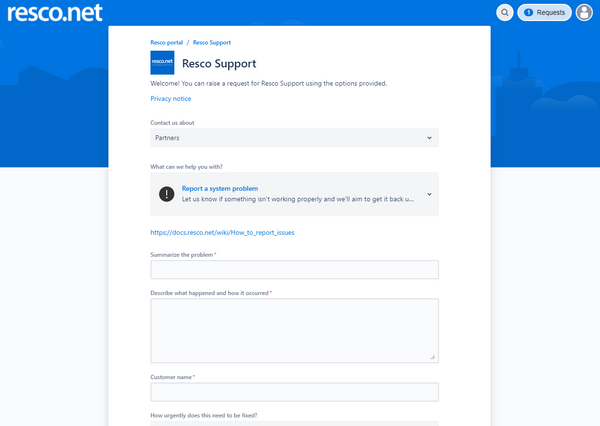
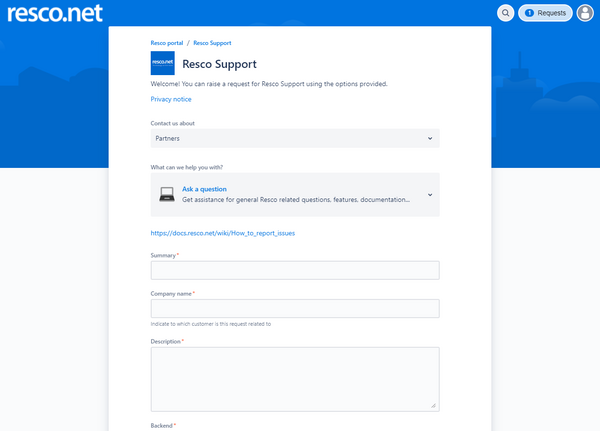
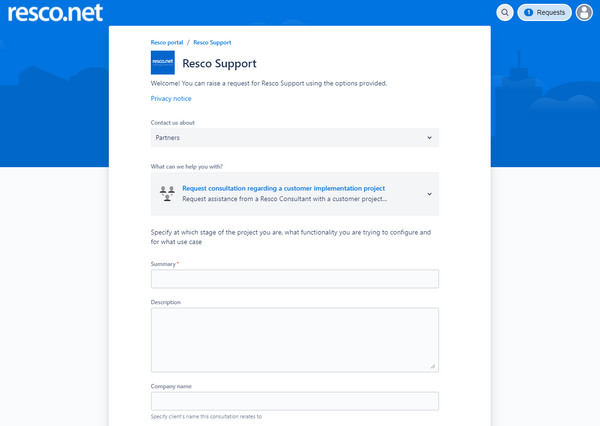
As a partner, you can create three types of requests. In each of them, please specify the customer’s name in question in the Company name field for reference.

- Report a system problem
- In case you or your customer experiences a problem that you need to solve with our assistance, please create this type of request

- Ask a question
- Use this request in case you have a question about documentation, features, how to question, best practice, or any other question where you need Resco Support’s assistance.

- Request consultation regarding a customer implementation project
- In case you require assistance from a Resco consultant, regarding an implementation project, best practices, how to solve a request from customer, please use this option.

Customer
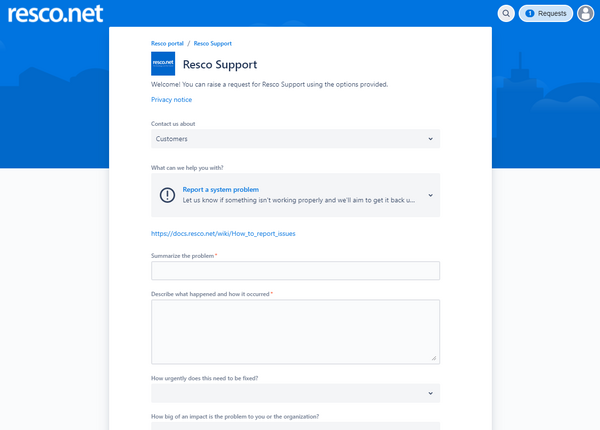
In case you do not use a partner’s service for Resco implementation or support, or you want to raise a request directly with us, please go to the Customer category. There you can find two request types.

- Report system problem
- In case you or your customer experiences a problem that you need to solve with our assistance, please create this type of request

- Ask a question
- Use this request in case you have a question about documentation, features, how to question, best practice, or any other question where you need Resco assistance.
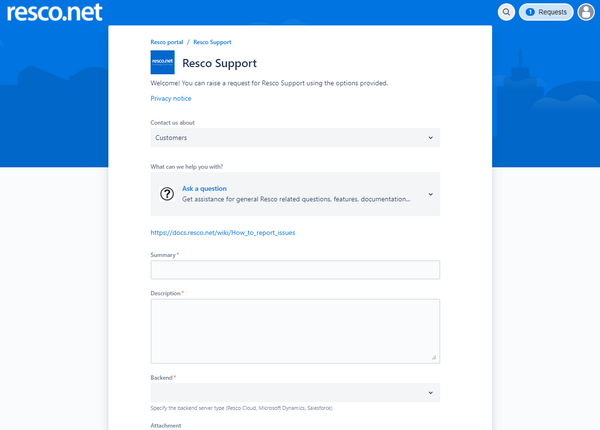

Portal options

Once you have a request created, you can browse the list of your requests by clicking Requests. You can also edit your account/profile information.
List of requests

By clicking on one of the options in the dropdown, you can choose a filter used to display requests.
- Created by me: Requests where you are the reporter, creator of the issues
- Name of the organization or company you are assigned to (in this case Lukas Organization): Requests that are shared with your organization
- All: All requests that you have access to, including those, where you are added as a participant
Account/Profile
Click the portrait to access the Account/Profile menu
- View or edit your profile, information we have and store within the Resco Support Portal
- Log out from the Resco Support Portal

On the profile screen, you can change your Name and Password, Language, and Time Zone.
Note that language can change the environment’s localization, but all information in tickets, fields, and overall communication with Resco Support is held in English only.

Request management
When you go to the list of requests (Created by me, Organization, all), you can see the requests with options to search, filter. Also, you can see details about the request itself.

When you click the Reference (request number) or Summary, you can open details about the request. There you can see details about the ticket, the whole communication between you and the support agent.
- You can also add comments, add additional information, attachments.
- Use Share to add request participants from your company, partner/customer, Resco business development manager, or anyone, with whom you want to share the ticket.
- You can turn off or on notifications that are sent to your email when the request changes

Available request statuses
- Open
- When creating a new request, it is in state Open. It means that the support agent needs to review it, ask for additional information to move it to the Accepted state.
- Accepted
- This state means that the request was initially reviewed and is ready to be processed.
- In progress
- The support agent is actively working on the request to provide answers.
- More info needed
- More information is needed from the reporter (who created the ticket and is actively awaiting resolution).
- Bug created
- We were able to reproduce the issue from the request and we have logged it to developers. As soon as we receive further information about the solution, we will update the request.
- Completed
- Request is completed with a resolution and waiting for approval from the reporter. The reporter is requested to “Close” the request if the request is fulfilled or “Reopen request” in case there is more to solve.
- Canceled
- Request is out of Resco’s support scope or is a duplicate.
- Closed
- The reporter approved the solution, and the request is archived.


Feedback
As part of the completion of the request, the reporter will receive satisfaction feedback. Please provide us with feedback, so we can get better.

Support email
We recommend visiting the Resco Support portal to request support. However, you can continue using the support email address (mobilecrm@resco.net); it remains operational to receive requests.
Each email sent to the support email is automatically forwarded to the Resco Support portal (guide) and converted into a request on the portal. The reporter receives an email notification that the request has been created. The reporters (and also additional email recipients, if any) become request participants and receive updates about the requests. Reporter and participants can access the request using the portal to see the request’s state and to provide updates if needed. Using the portal is not mandatory, reporters or participants can reply to the notification with the request number to update a request.
| Warning | Do not remove the request number from the email subject. |
What to include in a request
We recommend following these guidelines to ensure prompt response and resolution to your request.
Log from the application's About section
The log contains information about the mobile device, the version of the Resco app, errors, issues, and synchronization details. This information is vital for providing effective help and support. Even if there is no error shown during issue, the log can provide important information that lead to solution.
See Send log for information on how to get to the log.
Description of the issue
Provide a detailed description of the issue. Include the exact user steps how to reproduce the issue. Describe your observed behavior and also the expected behavior. Describe the use case.
Specify whether the issue occurs only for a specific user, group of users, on a specific platform (iOS, Android, Windows Store application, Windows msi application), with a certain project, privileges, or all users.
If possible, add information about any notable changes before you first observed the issue (update of operating system on the devices, update of the Resco Mobile CRM application, project change, update of the backend server, server process, permission changes, etc.).
Screenshots or video
If possible, provide a visual representation of the issue to help us understand the issue better.
Urgent issue
In case you want to report an urgent request (an issue that prevents your users from working or using the Resco technology), visit the Resco Support portal (see guide) and select the “Report a system problem” request to report such request for assistance. Do not forget to set the urgency and impact to the request.
Make sure to inform us about an issue as soon as possible. Even during internal investigation when your IT department and/or your implementation partner are investigating the issue. This way we can help steer the analysis, recommending what to focus on, troubleshooting with our know-how to help you solve the issue or mitigate its impacts in the shortest possible time.
Customer environment access request
There are issues, where we at Resco are not able to reproduce an issue, that was reported in request.
It can be caused by specific setup of the organization, its logic, project, custom app logic, environment, authentication, or the environment in general. In such cases, we can try to gather as much information about the environment, project, logic and analyze the circumstances to assist with solution.
Other option is to provide us with access to an environment, where the issue can be reproduced.
In such case, we would like to inform you about the conditions and basic principles that Resco Product support and Consultant agents will be following.
Conditions for Resco remote access
Resco Product Support accesses remotely Resco product user software environment based on the user’s request if:
- User uses Resco products under the agreement concluded with Resco or third party (e.g. implementation partner) and Resco has obligation to provide the support to the user and
- An issue in Resco technology was reported by the user and
- Fixing issue outside the user’s environment is not possible or reasonable (e.g. requires inadequate resources, time or effort).
At any moment, user is obliged to comply with applicable regulations and policies, including, e.g. data protection and information security obligations and policies.
Access for agent
Please make sure that the user account and its security role, privileges, assigned to the user account, provided to Resco as access to your environment, have the following attributes:
- Issue can be reproduced using this user account
- The privileges are set according to the least access principle – user can only see the data required for the reproduction of the issue
- Read-only access is often enough to reproduce the issue. If write/update access is required, please make sure it is provided only for the minimum range of entities/objects, required for the issue reproduction.
- Credentials should be provided in a secured way. We will provide a secured SharePoint document link, where only Support agents and reporter will have access to. In this document, reporter will fill in password for the user account to access the environment. URL and user name can be inserted to the request directly
- Once the root cause of the issue is confirmed, disable the user account access to environment (e.g., change password, disable user)
Production vs dev/test environment
When it comes to the environment, it depends on the type of environment, but you need to consider the above principles regardless of the type.
Whenever possible, use test, dev, UAT environment with non-production data to avoid and minimize any security or data breach.
In case it is not possible to reproduce the issue on previous environment, or these contain sensitive (e.g., personal or business) data, try to create an environment where the issue can be reproduced (e.g., by copying the metadata, project, without data) and create sample data or anonymized data only to reproduce the issue.
In case there is an issue on production environment, and there is no other way of reproducing the issue anywhere else (none of the above can be applied) we can be asked to access production environment. In such case, all the principles of non-production environment apply, and also the following ones:
- Request to access system backend
- The general statutory confidentiality applies to Resco employees. However, upon your request, Resco is prepared to sign NDA. Contact us for the agreement template.
Support agents are trained to avoid making any changes to the environment provided and perform only the actions required to reproduce the issue.
JSBridge issues
Before contacting technical support with a problem related to Resco JavaScript Bridge, please go through this sanity checklist of the most common reasons why a script is not loaded:
- Make sure you are using the most recent version of JSBridge.js library in your project: https://github.com/Resconet/JSBridge/blob/master/src/JSBridge.js.
- Make sure you are referencing this file correctly from the HTML document that you are trying to load.
- Make sure the HTML document is a valid HTML file.
- Make sure all script references in the HTML file are using the same capitalization, e.g., that you are not referencing the file "JSBridge.js" as "jsbridge.js" (this is not correct).
Privacy Notice Product Support
Introduction
This is the Privacy Notice for Product Support.
This information is intended for users which are interacting with Resco’s Product Support and Consultancy through the Customer Portal.
Users can be
- employees, contractors, or any type of representative of Resco’s Partners and/or Resco's Customers
- any other person who interacts with Resco Product support through the customer portal.
We are strongly committed to keeping your personal data safe. This commitment exists throughout the lifecycle of your personal data, from the design of any Resco service which uses personal data to the deletion of that data.
We think carefully about our use of personal data. Below you can find the details of what we do to protect your privacy. This policy covers, among other topics:
- Information about your rights, the choices available to you, and our obligations in the European Union.
- Transparency about how we collect and use your personal data, including when and how it is shared.
- Information on how we protect your personal data.
- Information on how we will facilitate your rights and respond to your questions.
Who are we?
RESCO spol. s r.o., Mlynské nivy 5, 821 09 Bratislava, Slovakia, is processing your personal data in the legal position of Controller.
This means that we are responsible for deciding how and why we hold and use your personal data.
If you want to contact us directly, you can find our contact details in the “How to contact us” section below.
About this Privacy Notice
This Privacy Notice explains how we collect, use, share, and transfer your personal data when you use the services provided via Resco Product Support. The Privacy Notice also explains your data privacy rights.
Personal data is any information about you by which you can be identified or be identifiable. This can include information such as:
- Everything what you provide during your registration and in your profile section: first name and last name, job title, your (company) e-mail address, country, city, company.
- information about your device (such as the IP address, which is a numerical code to identify your device that can provide information about the country, region, or city where you are based).
- information relating to how you use and interact with the Product Support Customer Portal.
Other Resco Sites
Resco operates various other sites. As user of Resco Product Support, you might be using other services as well. Some of Resco sites provide additional privacy information. You can read that information using these links:
- resco.NEXT (Resco conference)
- Resco Website (resco.net)
- blogs.resco.net (Blogs)
- docs.resco.net (Resco Wiki)
Sometimes, Resco Product Support Customer Portal may contain links to sites and services that are not part of the Resco family of offerings. These sites and services have their own privacy policies. If you follow a link to non-Resco sites and apps, you should read the privacy policy shown on their site.
We engage third party companies who assist us in providing our services and products or support us with certain functions of these applications.
Atlassian
Resco Customer Portal is a part of Jira Service Management and is operated by the cloud service provider Atlassian (Level 6, 341 George Street, Sydney, NSW 2000, Australia). Atlassian is storing and processing your personal data. You can read Atlassian’s privacy notice here: https://www.atlassian.com/legal/privacy-policy
Microsoft
We process some of your personal data via electronic communication (email). This occurs for example, when you contact our product support service via mobilecrm@resco.net. Microsoft (Microsoft Corporation, One Microsoft Way, Redmond, WA 98052-6399, USA) is our service provider for Office 365. In this position, Microsoft stores and processes your personal data on servers within the European Union. You can read Microsoft’s Privacy Statement here.
Lawful processing
We will only process your personal data if we have a lawful basis for doing so. Lawful bases for processing include consent, contractual performance and our “legitimate interests” as further described below.
- Contract Performance
We process Personal Data as a matter of “contractual necessity”. That means that we need to process the data to be able to perform the Product Support services for you. You are not obliged to provide Resco with your personal data. However, for providing support services to you, a minimum set of personal data is necessary for your participation in Resco Customer Portal.
- Legitimate Interest
When we have a business or commercial reason of our own to use your information, this is called a ‘legitimate interest’. We will tell you what that is, if we are going to rely on it as the reason for using your data. Even then, it must not unfairly go against your interests.
- Consent
In some cases, we process personal data based on the consent you expressly grant to us. When we process personal data based on your consent, we indicate that to you at the point and time of collection.
- Other Lawful Grounds
From time to time, we may also need to process personal data to comply with a legal obligation, if it is necessary to protect the vital interests of you or other data subjects, or if it is necessary for a task carried out in the public interest.
The next section references these lawful grounds for all types of personal data and all our processing activities.
Why are your personal data processed, on what lawful basis do we process it and for how long do we keep it?
| Create Account in Ticket System | |
|---|---|
| Personal Information | We obtain the data from you through the registration form published on the Resco Customer Portal. We also obtain the data when you update your profile in Resco Customer Portal: first name and last name, job title, your (company) email address, country, city, company |
| Purpose | We process this data to identify you as a user in Resco Product Support system and send you email notifications on the status of your support request. |
| Legal Basis | Legitimate Interest |
| How long do we store your data? | We store your data if you are registered in Resco Customer Portal. You can update your personal data by editing your profile.
In case you will not log in into Resco Customer Portal for 3 years, we will send you an email and ask whether you still want to continue using Resco Customer Portal services. We will delete your personal data and your profile, should you not log in for the period of 3 years. |
| Request Management | |
| Personal Information | Employee personal details (name, company, job role, email, UserID and other info in logfile.
Screenshots or video recordings from mobile device. |
| Purpose | Solving your support request |
| Legal Basis | Legitimate Interest. |
| How long do we store your data? | We store your data if you are registered in Resco Customer Portal. You can update your personal data by editing your profile.
In case you will not log in into Resco Customer Portal for 3 years, we will send you an email and ask whether you still want to continue using Resco Customer Portal services. We will delete your personal data and your profile, should you not log in for the period of 3 years. |
| Reproduce incidents on customer environment | |
| Personal Information | Contact data
Any personal data on customer systems needed for the analysis of the incident. |
| Purpose | Analyze, reproduce, and solve incidents on customer environments |
| Legal Basis | Legitimate Interest |
| How long do we store your data? | We store your data if you are registered in Resco Customer Portal. You can update your personal data by editing your profile.
In case you will not log in into Resco Customer Portal for 3 years, we will send you an email and ask whether you still want to continue using Resco Customer Portal services. We will delete your personal data and your profile, should you not log in for the period of 3 years. |
International Data Transfers
Data is stored within the European Economic Area (EEA).
From what sources do we obtain your personal data?
Resco obtains your personal data directly from you when you send us support requests.
Automated decision making and profiling
Resco Customer Portal does NOT make automated decisions nor profiling with legal or similar significant effect on you.
Personal data from Children
Resco Product Support is not directed at children. We do not knowingly collect personal data from children under the age of 16 unless (a) we have obtained consent from a parent or guardian, (b) such collection is subject to a separate agreement with us or (c) the visit by a child under the age of 16 is unsolicited or incidental. If you are a parent or guardian and believe your child has provided us with personal data without your consent, please contact us by using the information in the “How to contact us” section below and we will take steps to delete their personal data from our systems.
Security of your personal data
We have implemented appropriate technical, organizational, and physical controls to protect your personal data against unauthorized processing and against accidental loss, damage, or destruction.
You are responsible for choosing a secure password when we ask you to set up a password to access Resco Customer Portal. You should keep this password confidential, and you should choose a password that you do not use on any other site. You should not share your password with anyone else, including anyone who works for us.
Unfortunately, sending any information, including personal data, via the internet is not completely secure. We will do our best to protect your personal data once it is with us. Our hosting provider Atlassian Jira Service Management promote secure transport protocols. However, we cannot ultimately guarantee the security of any personal data sent to our site while still in transit, and you provide it at your own risk.
What are your rights regarding the personal data we hold about you?
You have several rights regarding the personal data that we hold about you and you can contact us regarding the following rights in relation to your personal data:
- You have the right to receive a copy of the personal data we hold about you.
- You have the right to correct the personal data we hold about you.
- Where applicable, you may also have a right to receive a machine-readable copy of your personal data.
- You also have the right to ask us to delete your personal data or restrict how it is used, consistent with the GDPR. There may be exceptions to the right to erasure for specific legal reasons which, if applicable, we will set out for you in the response to your request.
- Where applicable, you have the right to object to processing of your personal data for certain purposes.
- Where you have provided us with consent to use your personal data, you can withdraw this at any time.
- If you do not want us to use your personal data for marketing analysis, you can revoke your consent by clicking at a link at the bottom of marketing emails or contact us via mobilecrm@resco.net.
If you would like to exercise any of your rights specified above, please email to privacy@resco.net or write to the Data Protection Officer at Resco spol. s r.o. We will deal with your requests within 30 days.
We may need to request specific information from you to help us confirm your identity. If your request is complicated or if you have made many requests, it may take us longer. We will let you know if we need longer than one month to respond. You will not have to pay a fee to obtain a copy of your personal data (or to exercise any of the other rights). However, we may charge a reasonable fee if your request is clearly unfounded, repetitive, or excessive.
Complaints to supervisory authorities
Resco takes your rights very seriously. However, if you are of the opinion that we have not dealt with your reservations or complaints adequately, you have the right to submit a complaint to the responsible data privacy protection authorities. You can contact the supervisory authority in your country or in Slovakia:
- Office for Personal Data Protection of the Slovak Republic
- Hraničná 12, 820 07 Bratislava 27, Slovakia
- statny.dozor@pdp.gov.sk
How to contact us?
- Resco Product Support
- In case you have questions regarding the processing of your data please contact us at mobilecrm@resco.net.
- Resco Data Protection Officer
The correct and lawful processing of your personal data in Resco is supervised by Resco’s Data Protection Officer. You can contact our Data Protection Officer by letter or mail:
- RESCO spol. s r.o.
- Data Protection Officer
- Mlynské Nivy 5, 821 09 Bratislava, Slovakia
- privacy@resco.net
Changes to this Privacy Notice
If we decide to change our Privacy Notice we will post the changes here. If the changes are significant, we will get your permission or give you the opportunity to opt out of any new uses of your data. In such cases, you are prompted to agree with the updated privacy notice during your next login.
The most recent change was made on 25 January 2022.