
Releases/Autumn 2021: Difference between revisions
| Line 19: | Line 19: | ||
* '''Layout Type''' – Use '''List''' to display one question per row. Use '''Grid''' if you want to organize multiple questions in a row. See [[Questionnaire_Designer#Grid_layout|grid layout]] for more information. | * '''Layout Type''' – Use '''List''' to display one question per row. Use '''Grid''' if you want to organize multiple questions in a row. See [[Questionnaire_Designer#Grid_layout|grid layout]] for more information. | ||
== Houston == | |||
Houston mobile user interface now looks nicer on larger devices in landscape mode, such as tablets. | |||
Revision as of 07:46, 26 August 2021
| Warning | This page describes a function that has not yet been publicly released, or has been released in beta / preview quality. Subject to change. |
This release is planned for September 2021.
Platform
- You can now download multiple attachments in one batch during synchronization to save some API calls and potentially even improve sync performance.
- You can now set the maximum resolution for images you upload to Resco mobile apps in the parameter Upload Image Size.
Routes AI
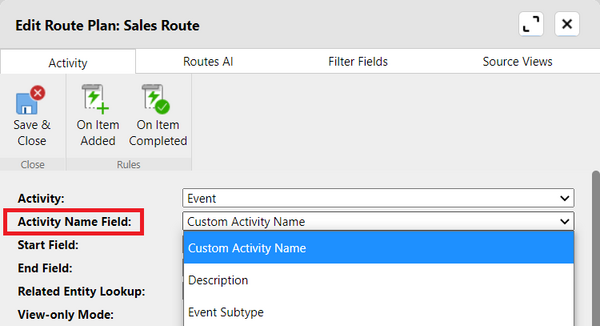
- Route plan configuration in Woodford now includes a new parameter Activity Name Field which allows you to define which field is displayed as the title of the record in the list and on the map.

- Mobile users can now optimize their routes even if there's an incomplete fixed-time appointment (ongoing or past).
Questionnaires
- Group Expanding – Choose Single Group if you want to keep only a single question group expanded when answering questionnaires. All other groups are collapsed to better focus your attention.
- Layout Type – Use List to display one question per row. Use Grid if you want to organize multiple questions in a row. See grid layout for more information.
Houston
Houston mobile user interface now looks nicer on larger devices in landscape mode, such as tablets.