Modernized Questionnaire Player: Difference between revisions
No edit summary |
No edit summary |
||
| Line 1: | Line 1: | ||
{{WIP}} | |||
Questionnaire Player is a Resco component that is responsible for displaying questionnaires to users. We are preparing the second generation of the questionnaire player that overcomes some of the shortcomings of the older player and opens new integration opportunities. | Questionnaire Player is a Resco component that is responsible for displaying questionnaires to users. We are preparing the second generation of the questionnaire player that overcomes some of the shortcomings of the older player and opens new integration opportunities. | ||
| Line 82: | Line 83: | ||
If you are selected for the limited preview, we will contact you with further information. Resco will enable the new features in your test organization. In this process, we will ask you to send us your [[Organization ID]]. | If you are selected for the limited preview, we will contact you with further information. Resco will enable the new features in your test organization. In this process, we will ask you to send us your [[Organization ID]]. | ||
== Get started with gen 2 == | |||
The preview is available for the following platforms: | |||
* Power Platform (with or without Dynamics features) | |||
* Resco Cloud | |||
The new player is available in two forms: | |||
* Part of Resco Mobile CRM | |||
* A PCF component you can add to your model-driven app | |||
=== Prepare your test environment on Power Platform === | |||
# Download the preview version of Resco Suite from [[Preview#Dataverse_/_Dynamics_/_Power_Platform|the Preview page]]. | |||
# Download the preview version of the questionnaire PCF from [http://pcf-download.resco.net/pcf/questionnaire Resco web]]. | |||
# Go to make.powerapps.com and install both solutions to a test environment. Make sure that this organization has the new features enabled as described above. | |||
# Wait until the installation concludes, then '''Publish all customizations'''. | |||
If you want to try out the gen 2 player as a PCF in a model-driven app, add the component to your forms. | |||
# In make.powerapps.com, edit the form for the questionnaire table. | |||
# Add a new form tab. Select the section included in the tab and hide its label. | |||
# Add component something something TBD | |||
# Select any text field as the component binding placeholder. If you are not familiar with PCF, check out also [[Resco Power Components]] documentation or [https://learn.microsoft.com/en-us/power-apps/developer/component-framework/overview Microsoft documentation about PCF]. | |||
# Select the added component and hide its label. | |||
# Save all changes. | |||
# Repeat the same steps for the Questionnaire Answer table. | |||
=== Prepare your test environment on Resco Cloud === | |||
# Log in to your organization at https://preview.resco.net. Make sure that this organization has the new features enabled as described above. | |||
# Start Woodford. | |||
# Create a new app project. Select Inspections as your initial template. | |||
# Go to the Questionnaire entity. Edit its view and add the field Feature Version. | |||
# Go to the QuestionnaireAnswer entity. Edit its view and a linked field: resco_questionnaire.resco_featureversion (templateid relationship) | |||
# Save all changes and publish the app project. | |||
=== Design a new questionnaire === | |||
=== Play the new questionnaire === | |||
== How to provide feedback? == | |||
You have several options for how you can leave feedback, report problems, or suggest improvements: | |||
* Use the [https://resconet.atlassian.net/servicedesk/customer/portals Resco support portal]. Select the '''Preview Feedback''' option. See [[How to report requests]] for more information about the portal. | |||
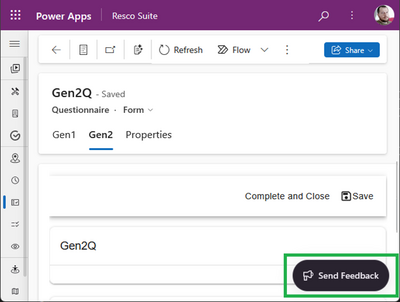
* Use the '''Send Feedback''' button directly from the Gen 2 player.<br>[[File:Send-feedback-gen2.png|400px|alt=how to send feedback directly from the player]] | |||
Revision as of 07:15, 19 May 2025
| Warning | Work in progress! We are in the process of updating the information on this page. Subject to change. |
Questionnaire Player is a Resco component that is responsible for displaying questionnaires to users. We are preparing the second generation of the questionnaire player that overcomes some of the shortcomings of the older player and opens new integration opportunities.
Why a new generation?
- Woodford dependency
- The gen 1 questionnaire player requires Woodford (or, more precisely, access to a mobile app project in Woodford) in order to display. By decoupling the player from Woodford, you can go beyond Resco Mobile CRM or Power Platform/Dynamics, you can display the player almost anywhere.
- Technology limitation
- The first generation of the player is based on the forms used in Resco Mobile CRM. Any questionnaire changes require custom development effort for each of the affected platforms (iOS, Android, Windows, web). Gen 2 brings a modern, platform-agnostic, and future-proof technology stack and allows for much faster development cycles.
- Outdated design
- Given the constraints of the gen 1 player, some features were impractical to implement. For example, a frequently desired feature, nested groups, is almost impossible for gen 1.
Feature highlights
Gen 2 questionnaires bring new features. The feature list below is not complete. Also, not all features are available in the first preview.
- Cover page
- Previously, questionnaires had a title and optionally a logo. Now you can design a full cover page with information about the questionnaire.
- Improved navigation
- Thanks to a new, automatically generated table of contents, you can jump straight to the question group that’s relevant for you. There’s also a new search function that allows you to find the question you need directly.
- Better descriptions
- You can now use formatted text to provide clear instructions to your inspector. Edit the text in the industry-standard Markdown format.
- Better questionnaire structure
Take advantage of nested groups that add hierarchy and organization to extensive questionnaires. Or organize questions into tables.
- New question types
- Semantic colors and global styles
Data model, answer storage, template format
Gen 2 questionnaires use only three tables:
- Resco_questionnaire for templates
- Resco_questionnaireanswer for answers
- Resco_questionnairefolder to keep templates organized in the Questionnaire Designer
If you are familiar with the generation 1 data model, you may notice that the resco_question and resco_questiongroup tables are not listed. We’re doing away with them, even in templates; all questions are now serialized (in gen 2 templates). Do not remove resco_question and resco_questiongroup tables from your server: they are needed in the Questionnaire Designer to support gen 1 questionnaires.
If you are already using the latest gen 1 answer storage options, nothing changes. Gen 2 supports only the latest data model:
- latest JSON schema (minimal JSON and flexible JSON)
- Resco_questionnaireanswer as the storage table
- Full template dependency
Preliminary release plan
May change without notice. Last updated: May 19, 2025.
| May 23, 2025 | 18.2 preview 1 |
| June 30 | 18.2 preview 2 |
| July 28 | 18.2 preview 3 |
| August 25 | 18.2 preview 4 |
| TBD | |
| Late 2025 | GA release |
In the early preview, some standard features are not yet available:
- Data mapping
- JavaScript
- Localization
- Tagged images
- Rules (partial support is already included, full support coming later)
We will periodically release new previews. For information about new features included in preview releases, check the preview documentation for release 18.2.
Apply for limited preview
In May 2025, we are starting a limited preview (closed beta) of the gen 2 player. Reach out to us on Resco web and fill out the registration form.
| Note | In the first phase, the number of previewers is limited. If you didn’t make it to the first phase of the preview, don’t worry. Another preview initiative, available to all interested parties, is planned to start in September. We will have more information about it later. |
If you are selected for the limited preview, we will contact you with further information. Resco will enable the new features in your test organization. In this process, we will ask you to send us your Organization ID.
Get started with gen 2
The preview is available for the following platforms:
- Power Platform (with or without Dynamics features)
- Resco Cloud
The new player is available in two forms:
- Part of Resco Mobile CRM
- A PCF component you can add to your model-driven app
Prepare your test environment on Power Platform
- Download the preview version of Resco Suite from the Preview page.
- Download the preview version of the questionnaire PCF from Resco web].
- Go to make.powerapps.com and install both solutions to a test environment. Make sure that this organization has the new features enabled as described above.
- Wait until the installation concludes, then Publish all customizations.
If you want to try out the gen 2 player as a PCF in a model-driven app, add the component to your forms.
- In make.powerapps.com, edit the form for the questionnaire table.
- Add a new form tab. Select the section included in the tab and hide its label.
- Add component something something TBD
- Select any text field as the component binding placeholder. If you are not familiar with PCF, check out also Resco Power Components documentation or Microsoft documentation about PCF.
- Select the added component and hide its label.
- Save all changes.
- Repeat the same steps for the Questionnaire Answer table.
Prepare your test environment on Resco Cloud
- Log in to your organization at https://preview.resco.net. Make sure that this organization has the new features enabled as described above.
- Start Woodford.
- Create a new app project. Select Inspections as your initial template.
- Go to the Questionnaire entity. Edit its view and add the field Feature Version.
- Go to the QuestionnaireAnswer entity. Edit its view and a linked field: resco_questionnaire.resco_featureversion (templateid relationship)
- Save all changes and publish the app project.
Design a new questionnaire
Play the new questionnaire
How to provide feedback?
You have several options for how you can leave feedback, report problems, or suggest improvements:
- Use the Resco support portal. Select the Preview Feedback option. See How to report requests for more information about the portal.
- Use the Send Feedback button directly from the Gen 2 player.