
Working hours: Difference between revisions
No edit summary |
|||
| Line 1: | Line 1: | ||
'''Working hours''' is a custom entity that allows you to configure working hours of your resources in the [[Schedule Board]]. This feature was designed for the [[resco.FieldService]] project (since [[Releases/Winter_2021|release 14.3]]), but it can be potentially reused for other organizations that use Schedule Board. | '''Working hours''' is a custom entity that allows you to configure working hours of your resources in the [[Schedule Board]]. This feature was designed for the [[resco.FieldService]] project (since [[Releases/Winter_2021|release 14.3]]), but it can be potentially reused for other organizations that use Schedule Board. | ||
== | == Prepare the necessary tables and columns == | ||
The following | The following two tables are necessary for this feature. On Dataverse, install a recent version of Woodford to make them available in your organization. | ||
;SB Working Hours (resco_fs_workinghours) | |||
: Each record corresponds to a different set of weekly working hours. You can define multiple working hours, each with a different name. | |||
: <small>On Resco Cloud, the entity is called Working hours (fs_workinghours).</small> | |||
;SB Settings (resco_fs_settings) | |||
: Select one of the configured working hours as the company default (the entity must have a lookup to the Working hours entity) | |||
: <small>On Resco Cloud, the entity is called Company settings (fs_settings).</small> | |||
;Resource table with a lookup to Working Hours | |||
: Additionally, designate a table that corresponds to your Schedule Board resources (i.e., the people responsible for a particular activity). This can be a standard table, for example, System User, or a custom table. In either case, this table must include a lookup column to the Working Hours table, called "workinghoursid". | |||
:[[File:Resource-table-lookup-to-working-hours.png|200px|alt=Add lookup column to your resource table, pointing to Working Hours table]] | |||
== Enable the tables in Woodford == | |||
Start Woodford and enable the necessary tables and columns. | |||
== Defining working hours == | == Defining working hours == | ||
Revision as of 19:18, 30 November 2023
Working hours is a custom entity that allows you to configure working hours of your resources in the Schedule Board. This feature was designed for the resco.FieldService project (since release 14.3), but it can be potentially reused for other organizations that use Schedule Board.
Prepare the necessary tables and columns
The following two tables are necessary for this feature. On Dataverse, install a recent version of Woodford to make them available in your organization.
- SB Working Hours (resco_fs_workinghours)
- Each record corresponds to a different set of weekly working hours. You can define multiple working hours, each with a different name.
- On Resco Cloud, the entity is called Working hours (fs_workinghours).
- SB Settings (resco_fs_settings)
- Select one of the configured working hours as the company default (the entity must have a lookup to the Working hours entity)
- On Resco Cloud, the entity is called Company settings (fs_settings).
- Resource table with a lookup to Working Hours
- Additionally, designate a table that corresponds to your Schedule Board resources (i.e., the people responsible for a particular activity). This can be a standard table, for example, System User, or a custom table. In either case, this table must include a lookup column to the Working Hours table, called "workinghoursid".
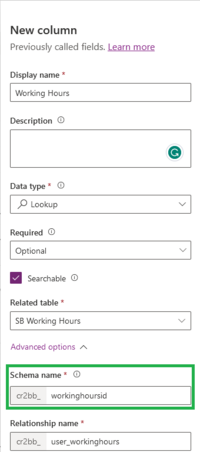

Enable the tables in Woodford
Start Woodford and enable the necessary tables and columns.
Defining working hours
When you create a form for the Working hours entity, the form automatically includes an editor.

The hours are saved in the Data field. If you need to work with the data directly, it is saved in JSON format. The numbers are in minutes.
{
  "workingHours": [
    [],
    [
      {
        "start": 480,
        "end": 780
      },
      {
        "start": 840,
        "end": 1140
      }
    ],
    [
      {
        "start": 480,
        "end": 960
      }
    ],
    [],
    [],
    [],
    null
  ],
  "workingHolidays": false
}
Associate resources with working hours
Once the working hours are defined, you can associate them, either as the default setting of the organization, or with a particular resource.


Working hours in action
If everything is properly configured, you can see the working hours highlighted in the Schedule Board timetable. Note that Luke's working hours are different from other team members.
