
Releases/Summer 2022: Difference between revisions
Marek Rodak (talk | contribs) |
|||
| Line 113: | Line 113: | ||
== Houston / Guides == | == Houston / Guides == | ||
===Guides | ===Guides for Microsoft Dynamics=== | ||
You can now access all Resco Guides features through Microsoft Dynamics. | You can now access all Resco [[Guides]] features through Microsoft Dynamics. | ||
===Redesigned | ===Redesigned harvesting=== | ||
We improved our harvesting design in the mobile and web app. You can now create new Guides through more user-friendly environment. | We improved our harvesting design in the mobile and web app. You can now create new Guides through a more user-friendly environment. | ||
[[File:NewGuide.png|400px]] | [[File:NewGuide.png|400px]] | ||
Revision as of 07:57, 13 June 2022
| Warning | This page describes a function that has not yet been publicly released, or has been released in beta / preview quality. Subject to change. |
The Summer 2022 release (15.1) is planned for late June 2022.
- Update preview blog
Resco Cloud
Import binary documents via Admin Console
We have improved the way how binary documents (such as images) can be imported into the database using the Admin Console. Until now, it was possible to include base64-encoded binary content directly in the CSV import files. With this release, you can instead import a ZIP file. The archive must include the CSV plus the individual binary documents. In the CSV file, use the document names instead of base64-encoded files.
See the Admin Console documentation for more information about importing entity records.
Okta authentication for Resco Cloud
Resco Cloud can use Okta for authentication.
Salesforce: Support for status picklist on the view for Campaign member object
We implemented this for the form, and now it's coming to the view as well. The "status" picklist related to the Salesforce Campaign member object (standard) should be restricted to display the status related to the related campaign only.
Misc
- Merge conflict form improvements
- Business process flow fixes
- Cascading delete for custom child-parent relationships
Bulk update
You can now update multiple records of an entity in bulk. See bulk update for more information.
Form caching
Form caching is a practice in Resco mobile apps that once a form is drawn, for example, to display the details of a particular account record, switching to a different record is fast, the form is reused. Only the data is replaced; tabs that were collapsed stay collapsed, fields that were hidden remain hidden, etc. The benefits of caching are clear: working with the app is much faster. Problems may occur if you're using (poorly written) business logic that relies on the form being in the initial default state.
With this release, Woodford admins can control which forms should be always or never reused. You can configure the global default in Configuration and you can override this in the properties of each form.

Fixes in monitoring synchronizations
We have introduced some fixes to the admin tools used for monitoring synchronizations at the organization level.
- In the Device control screen, the latest sync log is now properly listed in all circumstances.
- In the Sync Dashboard screen, the icon for synchronization errors is no longer sometimes suppressed if diagnostic logging is turned on in the app.
If your users experience long synchronization times and you use SharePoint, take a look at the new Storage analyzer report that offers insights into SharePoint document location records. Locations that point to CRM records not available in the offline database don't need to be downloaded and can be omitted using Sync Filter.
Inspections
Leaner JSON
In this release, we are introducing a lightweight version of JSON. We took a hard look at how questionnaire answers are stored, eliminating overhead, redundancies, and some rarely-used fields. This new storage format should help save storage requirements in large-scale deployment scenarios.
Change group labels using rules
You can now modify the label of questionnaire groups using rules. For example, the following rule will change the label of a group to "Done" when all questions are answered.

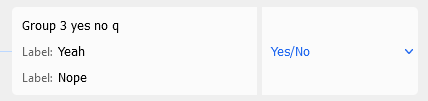
Tweaks to the Yes/No question
- The default labels for the Yes/No question are "Yes" and "No".
- When creating a questionnaire by importing an XLS file, you can now specify custom labels in the file instead of the default "Yes" and "No".

Static image size
Questionnaire designers have now more control over how static images are displayed in the app. Previously, larger images were automatically resized to 600x600 pixels (keeping the ratio). You can now manually set the maximum display width and/or height on the Properties pane. Smaller images will not be enlarged. These settings are ignored in the web app.
UI: Switching between groups & group icons
If your questionnaire includes multiple groups, you can switch between groups. On Android and iOS, you can swipe down to display the list of questionnaire groups. On Windows, this function was missing, but with this release, you can click the questionnaire caption to display this list.
We have also improved how custom group icons are displayed. The icons in the group list now match the icons in the questionnaire body. See how to add custom icons for questionnaire groups.

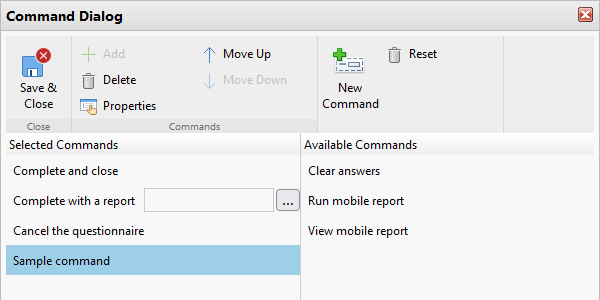
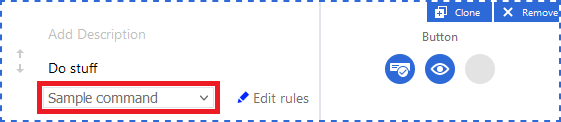
Custom commands for Button components
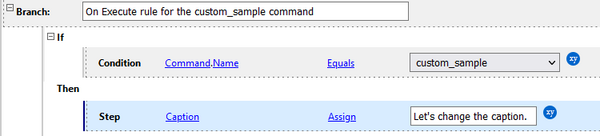
If you have custom commands defined in your questionnaire template, these commands are also available as options for buttons. The command's effects are defined using the On Execute rule.
- Create a custom command.
- Define the command action using an On Execute rule.
- Select the command as the action associated with a questionnaire button.


Grid layout editor improvements
When editing a custom grid layout, you can now toggle between user-friendly labels (current default) and logical names of the questions.

You can also delete unnecessary rows or columns directly from the editor. The (x) button for deletion appears when you point at the column or row header. Click the button to delete.

Access guides from questionnaires
You can now add guides as a static component to questionnaires. Inspectors can consult guides directly from the questionnaire and return to the inspection.
Reorder uploaded images
Inspectors can now change the order of images in multiple-image questions.
Schedule Board
- Filtering of resources for the selected source based on criteria, such as skills, territory, or distance
Houston / Guides
Guides for Microsoft Dynamics
You can now access all Resco Guides features through Microsoft Dynamics.
Redesigned harvesting
We improved our harvesting design in the mobile and web app. You can now create new Guides through a more user-friendly environment.
