
Integrations: Difference between revisions
Created page with "{{Integration TOC}} {{Beta}} The '''Integrations''' function of Woodford allows you to connect your Resco Cloud organization to various systems using connectors (Resco..." |
No edit summary |
||
| Line 3: | Line 3: | ||
{{Note|Integrations are available since '''release 14.1''' as a '''preview'''. Contact us if you want to help us shape this function to better match your needs.}} | {{Note|Integrations are available since '''release 14.1''' as a '''preview'''. Contact us if you want to help us shape this function to better match your needs.}} | ||
== Available connectors == | |||
The following connectors are available: | |||
* OData: Connect to any server that supports the Open Data Protocol (OData v4). | |||
* Resco Cloud: Connect to another organization residing on one of the various cloud servers of Resco (including Resco Inspections, Resco Routes, etc.). | |||
== Woodford configuration == | == Woodford configuration == | ||
You can manage your connections to other servers from the [[Woodford#Administration_menu|'''Administration''' menu of Woodford]]: Start Woodford and select '''Integrations (Preview)''' from the menu. | You can manage your connections to other servers from the [[Woodford#Administration_menu|'''Administration''' menu of Woodford]]: Start Woodford and select '''Integrations (Preview)''' from the menu. | ||
=== Create integration === | |||
# Click '''New'''. | |||
# Name your integration and select which connector to use. | |||
# Depending on the selected connector, enter the necessary connection details.<br>[[File:Create a new integration.png]] | |||
# Click '''Save'''. | |||
=== Metadata mapping === | |||
=== Import/export data === | |||
== Use case: connect to Business Central == | |||
You can use Integrations to connect to [[Business Central|Microsoft Dynamics 365 Business Central]]. | |||
Revision as of 08:37, 2 June 2021
| Integration with third-party systems |
|---|
|
Resco CRM Connector (web APIs):
|
| Warning | This page describes a function that has not yet been publicly released, or has been released in beta / preview quality. Subject to change. |
The Integrations function of Woodford allows you to connect your Resco Cloud organization to various systems using connectors (Resco Cloud, Dynamics, OData). Match entities and fields between the two servers and exchange data. Configured connections can be used in Resco Cloud jobs and workflows to automate sync process.
| Note | Integrations are available since release 14.1 as a preview. Contact us if you want to help us shape this function to better match your needs. |
Available connectors
The following connectors are available:
- OData: Connect to any server that supports the Open Data Protocol (OData v4).
- Resco Cloud: Connect to another organization residing on one of the various cloud servers of Resco (including Resco Inspections, Resco Routes, etc.).
Woodford configuration
You can manage your connections to other servers from the Administration menu of Woodford: Start Woodford and select Integrations (Preview) from the menu.
Create integration
- Click New.
- Name your integration and select which connector to use.
- Depending on the selected connector, enter the necessary connection details.
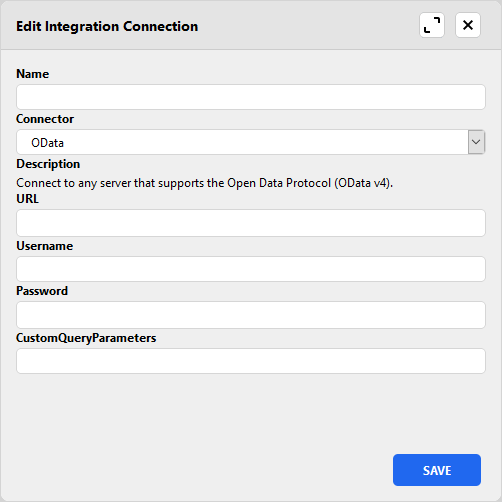
- Click Save.

Metadata mapping
Import/export data
Use case: connect to Business Central
You can use Integrations to connect to Microsoft Dynamics 365 Business Central.