
Report Designer examples: Difference between revisions
Created page with "This article describes some of the common examples of using the Report Designer. == Static image == Use static images for images that should not depend on the record(s)..." |
|||
| Line 10: | Line 10: | ||
== Dynamic image == | == Dynamic image == | ||
== Multiply values == | |||
== Cell visibility == | |||
== Automatic numbering of repeating blocks == | |||
Revision as of 09:39, 20 February 2020
This article describes some of the common examples of using the Report Designer.
Static image
Use static images for images that should not depend on the record(s) selected for the report. For example, you can add your company logo to the header block.
- Edit your app project in Woodford, select Offline HTML from the Project menu, and upload your static image. In this example, we create a Reports folder and add the file image01.png. Publish your project.

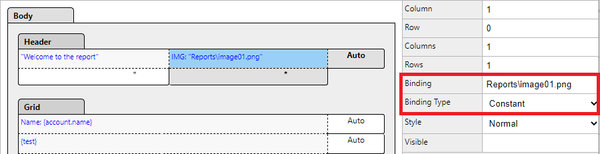
- In Report Designer, select a cell in the header block and click Add Image. Set Binding Type to Constant. As Binding, enter the path to your image. In our example Reports\image01.png.
- Synchronize the project and verify the result in the app.

