
Microsoft Fabric: Difference between revisions
Marek Rodak (talk | contribs) |
No edit summary |
||
| (15 intermediate revisions by 2 users not shown) | |||
| Line 1: | Line 1: | ||
Microsoft Fabric is a unified data analytics platform that provides tools for data movement, processing, ingestion, transformation, real-time event routing, and report generation. <!-- It incorporates OneLake, a unified data storage solution, eliminating the need to duplicate data for each data manipulation step. Fabric functions as Software as a Service (SaaS). It combines new and existing components from Power BI, Azure Synapse Analytics, Azure Data Factory, and other services into a unified environment. These components are then tailored to customized user experiences. --> | |||
Microsoft Fabric is a unified data analytics platform that provides tools for data movement, processing, ingestion, transformation, real-time event routing, and report generation. It incorporates OneLake, a unified data storage solution, eliminating the need to duplicate data for each data manipulation step. Fabric functions as Software as a Service (SaaS). It combines new and existing components from Power BI, Azure Synapse Analytics, Azure Data Factory, and other services into a unified environment. These components are then tailored to customized user experiences. | |||
If you are using [[Resco Inspections]], you can leverage Fabric to store and transform collected questionnaire answers and use the data to generate reports. | |||
[[File:FabricComponents.png|alt= components of ms fabric]] | [[File:FabricComponents.png|alt= components of ms fabric]] | ||
==Questionnaire data in Fabric== | == Questionnaire data in Fabric == | ||
Questionnaires are digital forms, usually running in Resco mobile apps, that allow you to collect data in the field. Microsoft Fabric is a tool designed for data management, and there are two main reasons to consider its integration: | Questionnaires are digital forms, usually running in Resco mobile apps, that allow you to collect data in the field. Microsoft Fabric is a tool designed for data management, and there are two main reasons to consider its integration: | ||
*The | ; The amount of the collected data | ||
* The amount of questionnaire data can grow substantially, increasing data storage expenses. Compared to Dataverse, Fabric offers a cheap alternative for storing large data. | |||
; Need for structured questionnaire data (AI and BI ready) | ; Need for structured questionnaire data (AI and BI ready) | ||
* To save storage, questionnaire answers are stored in a serializedanswer column in a JSON format. First, we have to transform this format to create structured data. Here, we can utilize the Fabric's notebooks. | |||
{{Note|Notebook is a multi-language interactive programming tool that executes Spark jobs to transform, process, and visualize data.|Tip}} | |||
We at Resco have developed a custom notebook (script) that crunches the data for you. This notebook is available on demand. The current script supports template-dependent questionnaires with flexible or minimal JSON. | |||
== How to import questionnaire data == | |||
#Create a Lakehouse from the landing page or go to '''Create''' in the left panel and select Lakehouse there. To this lakehouse, we import raw questionnaire data; it's a bronze data layer.<br>[[File:Homepage lakehouse.png|600px]] | To import data, we have to create a Lakehouse (collection of files, folders, and tables that represent a database). | ||
#In the lakehouse, click '''New Dataflow Gen2'''.<br>[[File:getdatain lakehouse.png|600px]] | |||
#When Dataflow loads, click '''Get Data''' in the top panel and select '''Dataverse''' as a new source.<br>[[File:getdata toppanel dataflow.png|600px]] | # Go to [https://app.fabric.microsoft.com/ Microsoft Fabric] and select '''Synapse Data Engineering''' experience. | ||
#Fill out the required information to connect to your Dataverse. | # Create a Lakehouse from the landing page or go to '''Create''' in the left panel and select Lakehouse there. To this lakehouse, we import raw questionnaire data; it's a bronze data layer.<br>[[File:Homepage lakehouse.png|600px]] | ||
#Once connected, select '''resco_ questionnaire''' and '''resco_question''' (plus tables you need for reporting later).<br>[[File:Dataflow choosedata.png]] | # In the lakehouse, click '''New Dataflow Gen2'''.<br>[[File:getdatain lakehouse.png|600px]] | ||
#Check the data destination and '''Publish''' the dataflow.<br>[[File:Publishdataflow.png]] | # When Dataflow loads, click '''Get Data''' in the top panel and select '''Dataverse''' as a new source.<br>[[File:getdata toppanel dataflow.png|600px]] | ||
# Fill out the required information to connect to your Dataverse. | |||
# Once connected, select '''resco_ questionnaire''' and '''resco_question''' (plus tables you need for reporting later).<br>[[File:Dataflow choosedata.png]] | |||
# Check the data destination and '''Publish''' the dataflow.<br>[[File:Publishdataflow.png]] | |||
== How to import notebook == | |||
Currently, the Notebook that handles the questionnaire data transformation is available on demand. Contact Resco support for more information. The notebook is a script file in .ipynb format. | |||
# Open the workspace while in Data Engineering experience. | |||
# Click '''New''' in top panel and then '''Import notebook'''.<br>[[File:Importnotebook.png]] | |||
# Click '''Upload''' and select the file. | |||
== Questionnaire data processing in notebook == | |||
Once the notebook is imported, the data processing can start. Questionnaire data processing consists primarily of parsing JSON in the <code>serializedanswers</code> column. The result of this transformation is a structured table where each column is one question, and each row is one questionnaire. There are multiple variables that need to be defined before the script can be used. | |||
;Initial variables: | ;Initial variables: | ||
Once initial variables are defined, click '''Run all''' in the top panel. | * source_lakehouse = name of bronze-layer lakehouse where we import raw questionnaire data | ||
* path = path to bronze lakehouse .../Tables/ | |||
* destination_lakehouse = name of the silver-layer lakehouse where we save transformed data | |||
* save_path = path to silver lakehouse ... /Tables/ | |||
* mergeVersions = True/False | |||
* neutralizeDataTypes = True/False | |||
;Saving methods: | |||
* mergeVersions = False<br>Each questionnaire is saved to a table specific to their version. | |||
* merge versions = True<br>Questionnaires with the same name are merged and saved into one table, despite the version (possibility of evolution conflict). | |||
;Evolution conflicts: | |||
Adding/Removing questions behavior: | |||
*Added question = new column | |||
*Removed question = column stays but null value in new questionnaires. | |||
*Merging questionnaire versions can cause evolution conflicts, primarily due to differing data types in one column. If this issue occurs, use the fallback neutralizeDataTypes = True. This will cast all columns into strings. | |||
Once initial variables are defined, click '''Run all''' in the top panel. | |||
[[File:RescoProcessingDemo.png|600px]] | [[File:RescoProcessingDemo.png|600px]] | ||
== Results and availability == | |||
By completed these steps, you can achieve the following: | |||
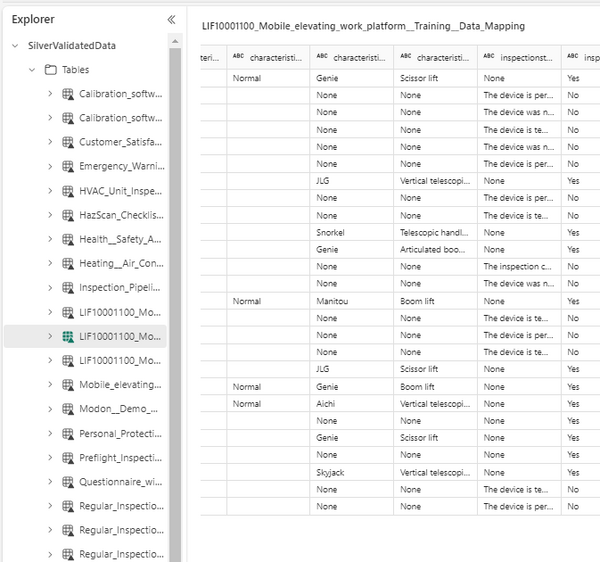
# Structured table for each questionnaire.<br>[[File:Structuredquestionnaires.png|600px]] | |||
# Structured data is AI and BI ready. | |||
# You can delete transferred data from Dataverse, reducing total storage cost. | |||
The notebook is currently on-demand. For more information please contact '''[https://resconet.atlassian.net/servicedesk/customer/portals Resco Support portal]'''. | |||
==See also== | |||
Alternatively, check out the following video that walks you through a very similar scenario. | |||
{{#ev:youtube|https://www.youtube.com/watch?v=MMx7_4i9Tuw|||||start=50}} | |||
Latest revision as of 08:16, 15 July 2024
Microsoft Fabric is a unified data analytics platform that provides tools for data movement, processing, ingestion, transformation, real-time event routing, and report generation.
If you are using Resco Inspections, you can leverage Fabric to store and transform collected questionnaire answers and use the data to generate reports.

Questionnaire data in Fabric
Questionnaires are digital forms, usually running in Resco mobile apps, that allow you to collect data in the field. Microsoft Fabric is a tool designed for data management, and there are two main reasons to consider its integration:
- The amount of the collected data
- The amount of questionnaire data can grow substantially, increasing data storage expenses. Compared to Dataverse, Fabric offers a cheap alternative for storing large data.
- Need for structured questionnaire data (AI and BI ready)
- To save storage, questionnaire answers are stored in a serializedanswer column in a JSON format. First, we have to transform this format to create structured data. Here, we can utilize the Fabric's notebooks.
| Tip | Notebook is a multi-language interactive programming tool that executes Spark jobs to transform, process, and visualize data. |
We at Resco have developed a custom notebook (script) that crunches the data for you. This notebook is available on demand. The current script supports template-dependent questionnaires with flexible or minimal JSON.
How to import questionnaire data
To import data, we have to create a Lakehouse (collection of files, folders, and tables that represent a database).
- Go to Microsoft Fabric and select Synapse Data Engineering experience.
- Create a Lakehouse from the landing page or go to Create in the left panel and select Lakehouse there. To this lakehouse, we import raw questionnaire data; it's a bronze data layer.

- In the lakehouse, click New Dataflow Gen2.

- When Dataflow loads, click Get Data in the top panel and select Dataverse as a new source.
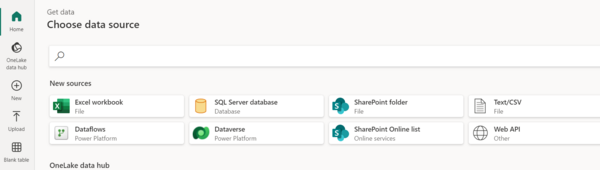
- Fill out the required information to connect to your Dataverse.
- Once connected, select resco_ questionnaire and resco_question (plus tables you need for reporting later).
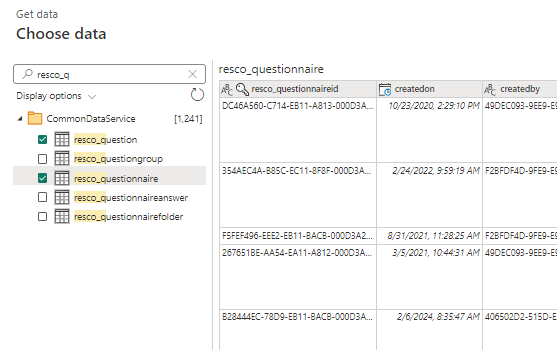
- Check the data destination and Publish the dataflow.
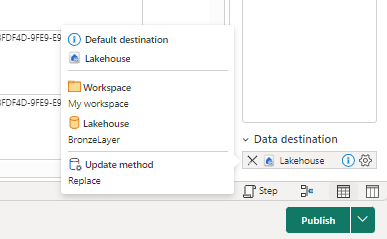


How to import notebook
Currently, the Notebook that handles the questionnaire data transformation is available on demand. Contact Resco support for more information. The notebook is a script file in .ipynb format.
- Open the workspace while in Data Engineering experience.
- Click New in top panel and then Import notebook.
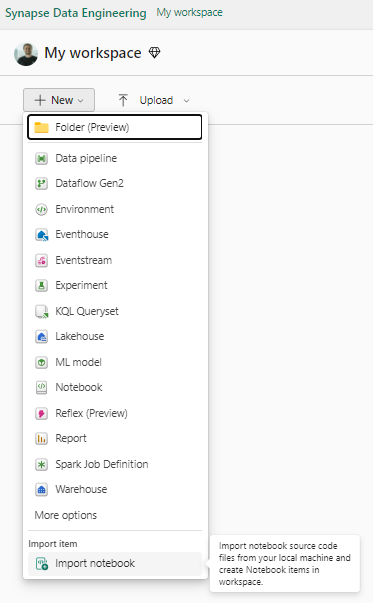
- Click Upload and select the file.

Questionnaire data processing in notebook
Once the notebook is imported, the data processing can start. Questionnaire data processing consists primarily of parsing JSON in the serializedanswers column. The result of this transformation is a structured table where each column is one question, and each row is one questionnaire. There are multiple variables that need to be defined before the script can be used.
- Initial variables
- source_lakehouse = name of bronze-layer lakehouse where we import raw questionnaire data
- path = path to bronze lakehouse .../Tables/
- destination_lakehouse = name of the silver-layer lakehouse where we save transformed data
- save_path = path to silver lakehouse ... /Tables/
- mergeVersions = True/False
- neutralizeDataTypes = True/False
- Saving methods
- mergeVersions = False
Each questionnaire is saved to a table specific to their version. - merge versions = True
Questionnaires with the same name are merged and saved into one table, despite the version (possibility of evolution conflict).
- Evolution conflicts
Adding/Removing questions behavior:
- Added question = new column
- Removed question = column stays but null value in new questionnaires.
- Merging questionnaire versions can cause evolution conflicts, primarily due to differing data types in one column. If this issue occurs, use the fallback neutralizeDataTypes = True. This will cast all columns into strings.
Once initial variables are defined, click Run all in the top panel.

Results and availability
By completed these steps, you can achieve the following:
- Structured table for each questionnaire.
- Structured data is AI and BI ready.
- You can delete transferred data from Dataverse, reducing total storage cost.

The notebook is currently on-demand. For more information please contact Resco Support portal.
See also
Alternatively, check out the following video that walks you through a very similar scenario.